Renewing your Business
Most entities need to be renewed yearly to stay active in Minnesota. If you miss the renewal, your business will be administratively dissolved, or no longer considered active in Minnesota, and you will have to reinstate it for it to be active again. The deadline for renewals is December 31, but you can renew at any time during the calendar year!
A renewal keeps an active business in good standing, while a reinstatement brings an inactive business entity 'back to life'. The processes are very similar, but annual renewals are free (for most entity types), while there is a fee to reinstate. This is a great reason to file your renewal on time each year: it saves you money!
Navigation | Click the images below to jump to each section

|

|

|

|

|
You can view your Business Record Details on our website to find out if you need to file a renewal or reinstatement. Follow the steps below to search for your business.
How to find your business filing information
1. Go to sos.mn.gov/findabiz and search for your business name.

If you cannot find your business after your initial search, check the spelling of your business name or flip the Filing Status toggle to "Inactive" and try your search again.

NOTE: If you find your business entity under "Inactive," it may have been administratively dissolved (no longer recognized as existing in Minnesota) for failure to file a past annual renewal. You may have it retroactively reinstated (as long as the name is still available) by filing a renewal for the current year and paying a fee. Step-by-step instructions for reinstating can be found here: How to reinstate your business filing.
2. After finding your business in the search results, click 'Details'.

3. You will see your 'Business Records Details' page, which shows the next renewal due date.
- A 2026 renewal due date means you may file now. The renewal must be filed by the Renewal Due Date, although you can file anytime during the calendar year (no need to wait!).
- A 2027 renewal due date means your 2026 renewal was already filed. The 2027 renewal will not be available until next year.
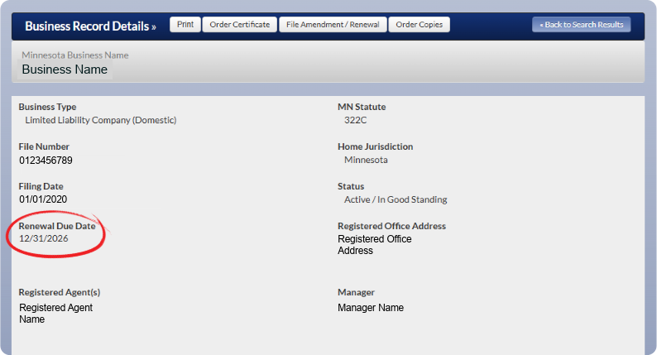
4. Click on “File Amendment/Renewal” from the Business Record Details page. You will then choose "Renewal" from the list of "Amendments-Available for Filing". Note: you must be logged in to complete the filing online. Step-by-step instructions for filing online can be found here: How to renew your business filing.

How to file your renewal or reinstatement | There are three ways to file (online filings are the easiest and fastest method of renewal):
|
Online (recommended!) |
|
In-Person (by appointment) |
|
Eligible filings submitted online are expedited and you will receive an email from our office when the filing has been processed. |
Filings submitted by mail are processed on a non-expedited, first-come, first-served basis. |
Filings submitted at our customer counter (by appointment) are expedited and processed while you wait. Customers will leave with their filed documents in hand. |
|
Filing online is the fastest way to complete your renewal or reinstatement. Use the links below to find step-by-step instructions for filing online:
|
Use the following link to find and print the appropriate form for your business entity type: Business Forms & Fees
Note: to reinstate via mail, complete the Annual Renewal form for your entity type and include the proper payment amount in the envelope with your filing. The reinstatement fee is listed on the form's Instruction page or can be found here: Business Filing & Certification Fee Schedule
Mail to:
Minnesota Secretary of State - Business Services |
Use the following link to make an appointment to file in-person at our customer counter in downtown St. Paul: Make an appointment
Our public counter is located at:
Minnesota Secretary of State - Business Services |
An annual renewal is a required yearly filing that keeps registered businesses active, updates basic company details, and prevents administrative dissolution. For most businesses, renewing is free, and you can complete the process at any time during the year, so there’s no need to wait until the deadline.
Keeping your business up to date also saves you money over time: Minnesota is one of only ten states that offer free annual renewal filings, helping reduce long-term operating costs for business owners. If you miss your annual renewal filing, your entity may be administratively dissolved, making it no longer active in Minnesota. To bring your business back into good standing, you would need to file a reinstatement and pay a fee.
Did you receive an "official notice" in the mail about filing your renewal? Minnesota business owners have reported receiving mailers offering to file their annual business renewals for a fee. Some of these mailers have incorrectly stated our fees for this filing.
The Office of the Minnesota Secretary of State will never send renewal notices or correspondence by mail. Our office will only send annual courtesy emails about renewing your business. Read more: Mail Solicitations

An annual reinstatement is the filing that restores an administratively dissolved or inactive business entity back to active status. It requires filing a current annual renewal and paying a fee. Note: your original business name must still be available. When your business is administratively dissolved, the name is reserved for one year before becoming available again.
Why do businesses get administratively dissolved? The most common reason for this is not filing the required annual renewal. In order for your business entity to become active again, you must file a reinstatement - see how to file. The good news is that, once the reinstatement is filed and the filing fee is paid, your business will be active again (but don't forget to renew the following year!).
"I can't find my business on your business search!"
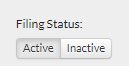
To keep our business search results manageable, we have separate search options for active and inactive businesses. If you cannot find your business after your initial search, check the spelling of your business name or flip the Filing Status toggle to "Inactive" and try your search again.
"Why is my business inactive?"
The most common reason for this is not filing the required annual renewal. In order for your business entity to become active again, you must file a reinstatement (see how to file). The good news is that, once the reinstatement is filed and the filing fee is paid, your business will be active again (but don't forget to renew the following year!).
"How do I know if I need to file a renewal?"
See "Do I need to file?"
When you search for your business online, you will find your 'Business Records Details' page, which shows the next renewal due date. 
The date shown is when your next renewal is due by. You may file your renewal at any point during the calendar year it's due.
"Why should I renew my business?"
Keeping your registration active has many purposes; namely, most banks or agencies won't help an inactive business.
Other reasons include:
- Avoid dissolution for failure to file a renewal (no longer recognized as active in Minnesota).
- Avoid Reinstatement fees.
- Avoid your business name being taken by someone else.
"Someone filed on my business and it wasn't me!"
Oftentimes if someone has filed a renewal on your business and didn't change anything, this may be a tax professional or a lawyer doing it for you.
If there WERE changes, someone may be trying to use your business to commit fraud. As of January 1, 2026, Minnesota has new legal protections for business owners who have become victims of business identity theft. Learn more: Minnesota Secretary of State - Business Identity Recovery.
"How can I protect my business from fraud?"
Some ways you can help manage your registration to minimize fraud include:
- Note your renewal due date in your business calendar and file the renewal on time.
- Make sure to maintain a valid official email address on file to receive renewal reminders and notifications when changes are made to your business.
- File any changes to your business in a timely manner, such as address, registered agent, name change, or other changes.
- Check your business details on the Minnesota Secretary of State’s online MBLS system. If changes have been made without your permission, correct your business record. Learn more: Minnesota Secretary of State - Business Identity Recovery.